h1902 Vienna Hybrid Dashboard Android
31 days old
h1902 Vienna Hybrid Dashboard is #35 in Watch Faces Grossing on Google Play in Mexico and charting in 6 of 23 countries we track.
Updated 25 Oct 2026 · rankings refresh through the day
DeveloperHappy Watch Faces
CategoryPersonalization
Price3.99 USD
Released
Installs100+
Rating★ 5.0 (19)
Updated
Content ratingEveryone
Rating
5.0 ★
19 ratings
Measured
Best rank now
#35
 Watch Faces Grossing
Measured
h1902 Vienna Hybrid Dashboard on Google Play
App details
App ID
com.AAA.h1902
Publisher
Tomas Joscak
Publisher country
Austria
Content rating
Everyone
h1902 Vienna Hybrid Dashboard downloads
Worldwide, per day, and installs to date. The band is open; the exact number is free with an account.
How this is calculated
Google Play shows an exact lifetime install count; downloads per day are its daily change (measured). When Play hasn't refreshed the count, they come from new ratings and Top Free chart positions. Confidence is the chance the real number is within half to double ours.
Where it ranks on Google Play
Every top 200 chart it appears in across 23 countries.
| Country | Charts | Rank |
|---|---|---|
| Mexico | Watch FacesGrossing | #35 |
 Indonesia Indonesia | Watch FacesGrossing | #34 |
 United Arab Emirates United Arab Emirates | Watch FacesGrossing | #34 |
 Turkey Turkey | Watch FacesGrossing | #35 |
 Thailand Thailand | Watch FacesGrossing | #35 |
 Vietnam Vietnam | Watch FacesGrossing | #34 |
Apps near h1902 Vienna Hybrid Dashboard on the chart
Watch Faces Grossing, around #35.


Ratings
Google Play, worldwide.
Rating
5.0 ★
19 ratings
Measured
Ratings
19
Measured
Written reviews
5
Measured
About h1902 Vienna Hybrid Dashboard
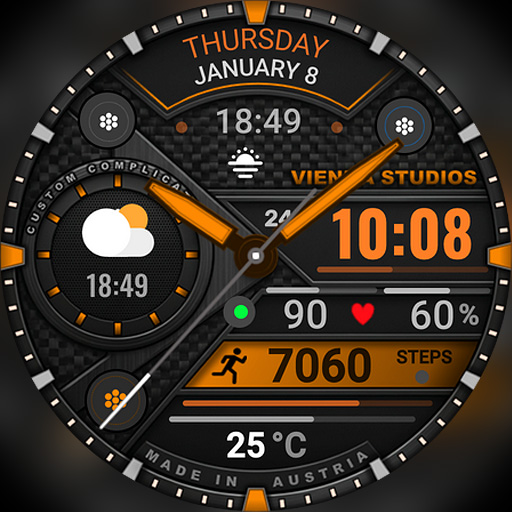
⌚ h1902 Vienna Hybrid Dashboard Watch Face
Classic watchmaking style meets a smart dashboard! h1902 is a sophisticated hybrid watch face for Wear OS that layers traditional analog hands over a bold digital time. With its mechanical, textured look and rich material details, it shows your date, steps, heart rate, temperature and battery in one elegant, information-rich design for everyday wear.
⌚ Features
- Hybrid design: analog hands + digital time
- 12h / 24h digital format (follows your phone settings)
- Full day of the week, month and date
- Daily step counter
- Heart rate (BPM)
- Current temperature
- Watch battery level (%)
- Mechanical, textured design with material details
🎨 Customization
- Many color accents, e.g. green, blue, purple, orange and red
- Background options
- Custom complication slot – e.g. weather conditions or sunrise / sunset
- Touch and hold the watch face, then tap "Customize"
🌦️ Weather not showing or not updating?
1. Make sure location is enabled on your phone and watch.
2. Open the Weather app on your watch and refresh it (e.g. tap "Last updated" or pull down).
3. Switch to another watch face for a few seconds, then switch back – this often refreshes the weather data.
4. Wait a few minutes for the data to sync.
❤️ Heart rate not showing?
Allow the "Sensors / Body sensors" permission when asked, and check that heart rate measuring is turned on in your health app (e.g. Samsung Health).
📲 How to install
1. Make sure your watch is connected to your phone (Galaxy Wearable or Pixel Watch app) and uses the same Google account.
2. On your phone, open the Play Store, tap the arrow next to "Install" and select your watch.
3. Or open the Play Store directly on your watch and search for "h1902".
4. After installation, touch and hold your current watch face, swipe to the end, tap "+" and select h1902.
Tip: It can take a few minutes until the watch face appears on your watch.
⌚ Supported devices
Compatible with all Wear OS 5+ smartwatches (API level 34+), including:
- Samsung Galaxy Watch 4, 5, 6, 7, 8, Classic and Ultra series
- Google Pixel Watch 1, 2, 3 and 4
- Other Wear OS 5+ watches
Not compatible with Tizen (Galaxy Watch 3 or older) or Apple Watch.
💬 Support
Questions or problems? Please write to us before leaving a review – we are happy to help!
📩 [email protected]
🌐 www.viennastudios.com
💛 Thank you for choosing Happy Watch Faces by Vienna Studios!
We hope this design brightens your day and your wrist 😊
Classic watchmaking style meets a smart dashboard! h1902 is a sophisticated hybrid watch face for Wear OS that layers traditional analog hands over a bold digital time. With its mechanical, textured look and rich material details, it shows your date, steps, heart rate, temperature and battery in one elegant, information-rich design for everyday wear.
⌚ Features
- Hybrid design: analog hands + digital time
- 12h / 24h digital format (follows your phone settings)
- Full day of the week, month and date
- Daily step counter
- Heart rate (BPM)
- Current temperature
- Watch battery level (%)
- Mechanical, textured design with material details
🎨 Customization
- Many color accents, e.g. green, blue, purple, orange and red
- Background options
- Custom complication slot – e.g. weather conditions or sunrise / sunset
- Touch and hold the watch face, then tap "Customize"
🌦️ Weather not showing or not updating?
1. Make sure location is enabled on your phone and watch.
2. Open the Weather app on your watch and refresh it (e.g. tap "Last updated" or pull down).
3. Switch to another watch face for a few seconds, then switch back – this often refreshes the weather data.
4. Wait a few minutes for the data to sync.
❤️ Heart rate not showing?
Allow the "Sensors / Body sensors" permission when asked, and check that heart rate measuring is turned on in your health app (e.g. Samsung Health).
📲 How to install
1. Make sure your watch is connected to your phone (Galaxy Wearable or Pixel Watch app) and uses the same Google account.
2. On your phone, open the Play Store, tap the arrow next to "Install" and select your watch.
3. Or open the Play Store directly on your watch and search for "h1902".
4. After installation, touch and hold your current watch face, swipe to the end, tap "+" and select h1902.
Tip: It can take a few minutes until the watch face appears on your watch.
⌚ Supported devices
Compatible with all Wear OS 5+ smartwatches (API level 34+), including:
- Samsung Galaxy Watch 4, 5, 6, 7, 8, Classic and Ultra series
- Google Pixel Watch 1, 2, 3 and 4
- Other Wear OS 5+ watches
Not compatible with Tizen (Galaxy Watch 3 or older) or Apple Watch.
💬 Support
Questions or problems? Please write to us before leaving a review – we are happy to help!
📩 [email protected]
🌐 www.viennastudios.com
💛 Thank you for choosing Happy Watch Faces by Vienna Studios!
We hope this design brightens your day and your wrist 😊