Color FitnessTracker WatchFace Downloads & RevenueColor FitnessTracker WatchFace · Google Play
Not in a tracked Google Play top chart right now.
Updated 3 Nov 2026 · rankings refresh through the day
DeveloperFilmmotion Studio
CategoryPersonalization
PriceFree
Released
Installs5k+
Rating★ 4.6 (40)
Updated
Content ratingEveryone
Color FitnessTracker WatchFace update history & changes
Last change · 5 events since 2 Jan 2026Full timeline ↓📈Dropped out of every chart we track📈Charting in a new country🆕First spotted by AppInsider🆕Released on Google Play
Full timeline · 5 events
- 📈Color FitnessTracker WatchFace dropped out of every chart we trackLast seen 24 Oct
- 📈Color FitnessTracker WatchFace charting in a new countryNetherlands
- 📈Color FitnessTracker WatchFace charting in a new country in 2 chartsIndonesia · Saudi Arabia
- 🆕Color FitnessTracker WatchFace first spotted by AppInsiderUnited Arab Emirates
- 🆕Color FitnessTracker WatchFace released on Google Play
Collected from the stores by AppInsider since we first spotted the app. Dates are when we saw each change.
Rating
4.6 ★
40 ratings
Measured
Color FitnessTracker WatchFace on Google Play
App details
App ID
com.digitalwatchface.fitnesstracker.watchface
Publisher
DEVGANIYA RAHULBHAI RAGHAVBHAI
Publisher country
India
Content rating
Everyone
Color FitnessTracker WatchFace downloads
Worldwide, per day, and installs to date. The band is open; the exact number is free with an account.
How this is calculated
Google Play shows an exact lifetime install count; downloads per day are its daily change (measured). When Play hasn't refreshed the count, they come from new ratings and Top Free chart positions. Confidence is the chance the real number is within half to double ours.
Active users
All platforms, worldwide. Free with an account.
Stickiness (DAU / MAU)
how many monthly users open it on a given day
How this is calculated
Monthly users come from lifetime installs across every store, fitted on monthly active user figures companies publish; daily users = monthly × the typical daily/monthly ratio for the category. Confidence is the chance the real number is within half to double ours.
Business model: Ad-led
How Color FitnessTracker WatchFace makes money: subscriptions, one-off purchases and ads.
Ads
Ads
/mo
of revenue
Where it ranks on Google Play
Every top 200 chart it appears in across 23 countries.
| Country | Charts | Rank |
|---|---|---|
| Not in a Google Play top chart right now. | ||
Ratings
Google Play, worldwide.
Rating
4.6 ★
40 ratings
Measured
Ratings
40
Measured
About Color FitnessTracker WatchFace
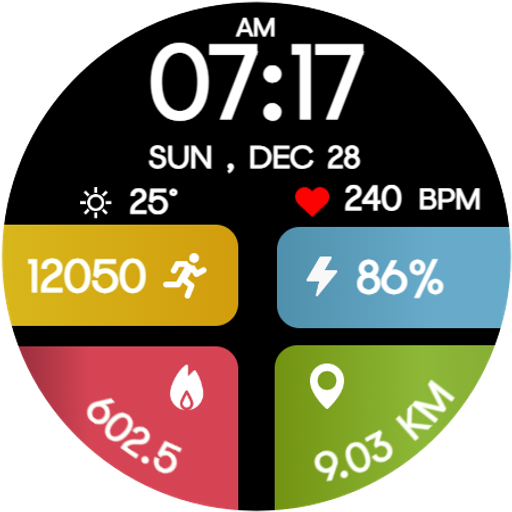
Experience a bold and colorful way to track your daily activity with the Color FitnessTracker WatchFace—a dynamic Wear OS watch face designed for fitness lovers who want clear stats at a glance. Packed with vibrant activity panels, clean digital time, and essential health data, it delivers both style and performance on your wrist.
🔥 Perfect For:
Men, women, and anyone who loves fitness, sports, activity tracking, colorful digital watch faces, and clean data-focused layouts.
💪 Ideal for Daily Use:
Whether you're running, walking, cycling, at the gym, or during everyday routines, this watch face keeps your steps, calories, heart rate, distance, and battery just a glance away.
✨ Key Features:
1. Colorful Fitness Panels for steps, calories, distance & battery.
2. Digital Display: Time, date, weather, heart rate & BPM.
3. Always-On Display (AOD) Support for clear visibility anytime.
4. Smooth, optimized performance on all Wear OS devices.
5. Clean, bold layout designed for active users and daily tracking.
⚙️ Phone Companion App
• The companion phone app helps you install, manage, and locate the watch face on your Wear OS smartwatch easily.
🕒 Watch Face Features
• 12/24h Digital Time
• Steps Counter
• Calories Burned
• Walking/Running Distance
• Heart Rate & BPM
• Battery Percentage
• Date & Day
• Weather (Temperature)
• Always-On Display (AOD) Compatible
• Vibrant Color Segments for easy readability .
📲 Installation Instructions:
1. Open the Companion App on your phone.
2. Tap “Install on Watch.”
3.On your watch, select Color FitnessTracker WatchFace from your watch face gallery.
✅ Compatibility:
• Compatible with all Wear OS devices (API 33+), including Google Pixel Watch, Samsung Galaxy Watch, and more.
• ❌ Not suitable for rectangular watches.
• Boost your daily motivation and stay on top of your health stats with the Color FitnessTracker WatchFace—a perfect fusion of fitness tracking, color, and clarity. 💛💙❤️💚