![[69D] V2 icon](https://play-lh.googleusercontent.com/gBKSCU_8PaUt9GrrCZJ9NR_M9g_41sthoBpjKX85Bb4NkeneyXvyMkPeF1jifvIIqUAfT1fkcIhCLenx6vM5fA)
[69D] V2 Android
[69D] V2 is #148 in Watch Faces Free on Google Play in Mexico and charting in 8 of 23 countries we track.
Updated 25 Oct 2026 · rankings refresh through the day
Developer69 Design
CategoryPersonalization
PriceFree
Released
Installs50k+
Rating★ 5.0 (267)
Updated
Content ratingEveryone
Rating
5.0 ★
267 ratings
Measured
Best rank now
#148
 Watch Faces Free
Measured
[69D] V2 on Google Play
App details
App ID
com.sixty9design.v2
Publisher
CAVMEDIA ADRIAN ROGALSKI
Publisher country
Poland
Content rating
Everyone
[69D] V2 downloads
Worldwide, per day, and installs to date. The band is open; the exact number is free with an account.
How this is calculated
Google Play shows an exact lifetime install count; downloads per day are its daily change (measured). When Play hasn't refreshed the count, they come from new ratings and Top Free chart positions. Confidence is the chance the real number is within half to double ours.
Active users
All platforms, worldwide. Free with an account.
Stickiness (DAU / MAU)
how many monthly users open it on a given day
How this is calculated
Monthly users come from lifetime installs across every store, fitted on monthly active user figures companies publish; daily users = monthly × the typical daily/monthly ratio for the category. Confidence is the chance the real number is within half to double ours.
Where it ranks on Google Play
Every top 200 chart it appears in across 23 countries.
| Country | Charts | Rank |
|---|---|---|
| Mexico | Watch FacesFree | #148 |
 Indonesia Indonesia | Watch FacesFree | #150 |
 Saudi Arabia Saudi Arabia | Watch FacesFree | #157 |
 Turkey Turkey | Watch FacesFree | #161 |
 Netherlands Netherlands | Watch FacesFree | #161 |
 United Arab Emirates United Arab Emirates | Watch FacesFree | #165 |
 Thailand Thailand | Watch FacesFree | #143 |
 Vietnam Vietnam | Watch FacesFree | #159 |
Apps near [69D] V2 on the chart
Watch Faces Free, around #148.




Ratings
Google Play, worldwide.
Rating
5.0 ★
267 ratings
Measured
Ratings
267
Measured
Written reviews
11
Measured
About [69D] V2
-IMPORTANT---------------------------
In case of problems with the installation of the watch face on your watch, please copy the link below and paste it into your web browser (not Google play app), there you will be able to choose the device on which watch face should be installed.
Link:
https://play.google.com/store/apps/details?id=com.sixty9design.v2
-------------------------------------
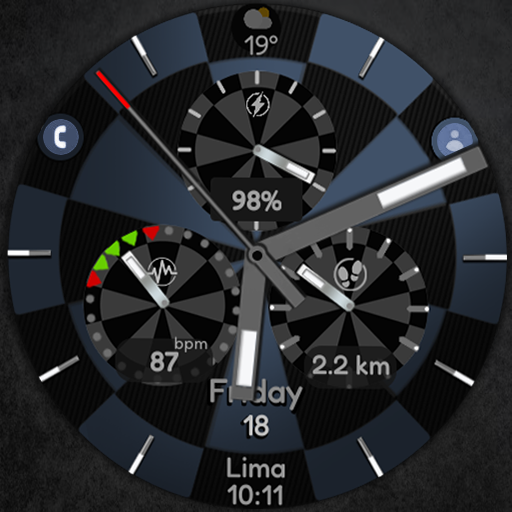
Please enjoy this outstanding watch face with many selection of customizable elements.
A lot of possible designs combination!
Now you can create your perfect combination which suits your taste.
Features:
- 30 color combinations
- 3 watch face body
- Watch face glass on/off
- Application shortcuts with help (no need to remember where they are, just tap watch face for help)
- 12/24 hour format;
- Steps count
- Date
- Complication area designed for weather
NOTE:
This app is made for Wear OS devices.
Please select "download on your watch device" from the "INSTALL" drop-down menu.
Some app shortcuts functionality may depend on the Wear OS device you're using, as some apps may not be available on certain devices (for example: Heart rate monitor, Messages, Phone, Music Player).
This watch face is compatible with most Wear OS devices, but keep in mind that it will run best and smoothest on newer devices with latest Wear OS software versions.
Please note the attached instructions above (graphic images) which explain how to configure the watch face.
Thank you.
69 Design
Follow us on Instagram: https://www.instagram.com/_69_design_/
In case of problems with the installation of the watch face on your watch, please copy the link below and paste it into your web browser (not Google play app), there you will be able to choose the device on which watch face should be installed.
Link:
https://play.google.com/store/apps/details?id=com.sixty9design.v2
-------------------------------------
Please enjoy this outstanding watch face with many selection of customizable elements.
A lot of possible designs combination!
Now you can create your perfect combination which suits your taste.
Features:
- 30 color combinations
- 3 watch face body
- Watch face glass on/off
- Application shortcuts with help (no need to remember where they are, just tap watch face for help)
- 12/24 hour format;
- Steps count
- Date
- Complication area designed for weather
NOTE:
This app is made for Wear OS devices.
Please select "download on your watch device" from the "INSTALL" drop-down menu.
Some app shortcuts functionality may depend on the Wear OS device you're using, as some apps may not be available on certain devices (for example: Heart rate monitor, Messages, Phone, Music Player).
This watch face is compatible with most Wear OS devices, but keep in mind that it will run best and smoothest on newer devices with latest Wear OS software versions.
Please note the attached instructions above (graphic images) which explain how to configure the watch face.
Thank you.
69 Design
Follow us on Instagram: https://www.instagram.com/_69_design_/
What's new
Customizable hybrid watch face for Wear OS watches.