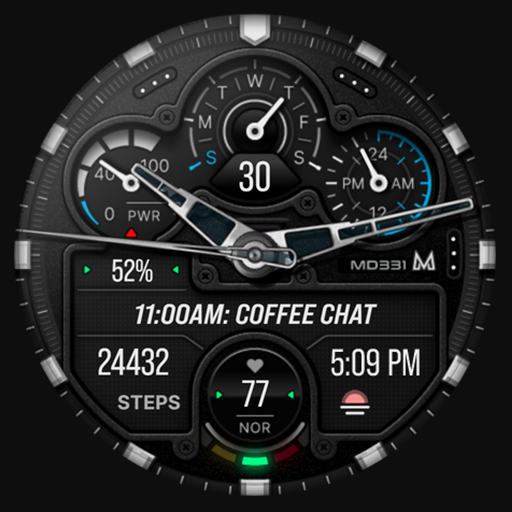
MD331 Analog watch face Downloads & RevenueMD331 Analog watch face · Google Play
Not in a tracked Google Play top chart right now.
Updated 2 Nov 2026 · rankings refresh through the day
DeveloperMatteo Dini MD ® Watch Faces
CategoryPersonalization
Price1.99 USD
Released
Installs5k+
Rating★ 4.5 (193)
Updated
Content ratingEveryone
MD331 Analog watch face update history & changes
Last change · 2 events since 1 Nov 2023Full timeline ↓Full timeline · 2 events
- 🆕MD331 Analog watch face first spotted by AppInsiderUnited States (found via similar)
- 🆕MD331 Analog watch face released on Google Play
Collected from the stores by AppInsider since we first spotted the app. Dates are when we saw each change.
Rating
4.5 ★
193 ratings
Measured
MD331 Analog watch face on Google Play
App details
App ID
com.watchfacestudio.md331
Publisher
CANALETTI VANIA
Publisher country
Italy
Content rating
Everyone
MD331 Analog watch face downloads
Worldwide, per day, and installs to date. The band is open; the exact number is free with an account.
How this is calculated
Google Play shows an exact lifetime install count; downloads per day are its daily change (measured). When Play hasn't refreshed the count, they come from new ratings and Top Free chart positions. Confidence is the chance the real number is within half to double ours.
Active users
All platforms, worldwide. Free with an account.
Stickiness (DAU / MAU)
how many monthly users open it on a given day
How this is calculated
Monthly users come from lifetime installs across every store, fitted on monthly active user figures companies publish; daily users = monthly × the typical daily/monthly ratio for the category. Confidence is the chance the real number is within half to double ours.
Where it ranks on Google Play
Every top 200 chart it appears in across 23 countries.
| Country | Charts | Rank |
|---|---|---|
| Not in a Google Play top chart right now. | ||
Ratings
Google Play, worldwide.
Rating
4.5 ★
193 ratings
Measured
Ratings
193
Measured
Written reviews
32
Measured
About MD331 Analog watch face
New watch face format.
Note for Galaxy Watch Users: The watch face editor in the Samsung Wearable app often fails to load complex watch faces like this one.
This is not an issue with the watch face itself.
It is recommended to customize the watch face directly on the watch until Samsung resolves this issue.
TAP AND HOLD SCREEN ON WATCH AND SELECT CUSTOMIZE.
It contains 4 Preset App shortcuts, 3 customizable shortcuts, 3 customizable complications where you can have the data you prefer like weather, barometer, distance walked, calories, uv index, chanche of rain and many more.
INSTALLATION NOTES:
Please check this link for installation and troubleshooting guide:
https://www.matteodinimd.com/watchface-installation/
This watch face supports all Wear OS devices with API Level 33+ (Wear OS 4 and later versions) like Samsung Galaxy Watch 4-8, Ultra, Pixel Watch etc.
Highlights:
- Analog design
- Date
- Day
- Battery
- Heart Rate + Intervals
- 4 Preset app shortcuts
- 3 customizable shortcuts
- 3 customizable complications
- Changeable colors of bezel, dials, theme and general colors
- Changeable styles of hands
Customization:
1 - Touch and hold display
2 - Tap on customize option
Preset APP Shortcuts:
- Calendar
- Alarms
- Battery
- Measure Heart Rate
Complications:
you can customize the watch face with the any data you want.
For example, you can select weather, health data such calories, distance walked, world clock, barometer and many more.
Please note that complications are NOT part of the watch face but are external apps and we have NO control over them. Thank you.
**some features may not be available on some watches.
Let's keep in touch:
Newsletter:
Sign up to stay updated with new watchfaces and promotions!
http://eepurl.com/hlRcvf
FACEBOOK:
https://www.facebook.com/matteodiniwatchfaces
INSTAGRAM:
https://www.instagram.com/mdwatchfaces/
TELEGRAM:
https://t.me/mdwatchfaces
WEB:
https://www.matteodinimd.com
Thank you.
Note for Galaxy Watch Users: The watch face editor in the Samsung Wearable app often fails to load complex watch faces like this one.
This is not an issue with the watch face itself.
It is recommended to customize the watch face directly on the watch until Samsung resolves this issue.
TAP AND HOLD SCREEN ON WATCH AND SELECT CUSTOMIZE.
It contains 4 Preset App shortcuts, 3 customizable shortcuts, 3 customizable complications where you can have the data you prefer like weather, barometer, distance walked, calories, uv index, chanche of rain and many more.
INSTALLATION NOTES:
Please check this link for installation and troubleshooting guide:
https://www.matteodinimd.com/watchface-installation/
This watch face supports all Wear OS devices with API Level 33+ (Wear OS 4 and later versions) like Samsung Galaxy Watch 4-8, Ultra, Pixel Watch etc.
Highlights:
- Analog design
- Date
- Day
- Battery
- Heart Rate + Intervals
- 4 Preset app shortcuts
- 3 customizable shortcuts
- 3 customizable complications
- Changeable colors of bezel, dials, theme and general colors
- Changeable styles of hands
Customization:
1 - Touch and hold display
2 - Tap on customize option
Preset APP Shortcuts:
- Calendar
- Alarms
- Battery
- Measure Heart Rate
Complications:
you can customize the watch face with the any data you want.
For example, you can select weather, health data such calories, distance walked, world clock, barometer and many more.
Please note that complications are NOT part of the watch face but are external apps and we have NO control over them. Thank you.
**some features may not be available on some watches.
Let's keep in touch:
Newsletter:
Sign up to stay updated with new watchfaces and promotions!
http://eepurl.com/hlRcvf
FACEBOOK:
https://www.facebook.com/matteodiniwatchfaces
INSTAGRAM:
https://www.instagram.com/mdwatchfaces/
TELEGRAM:
https://t.me/mdwatchfaces
WEB:
https://www.matteodinimd.com
Thank you.
What's new
App updated to API 3.6