
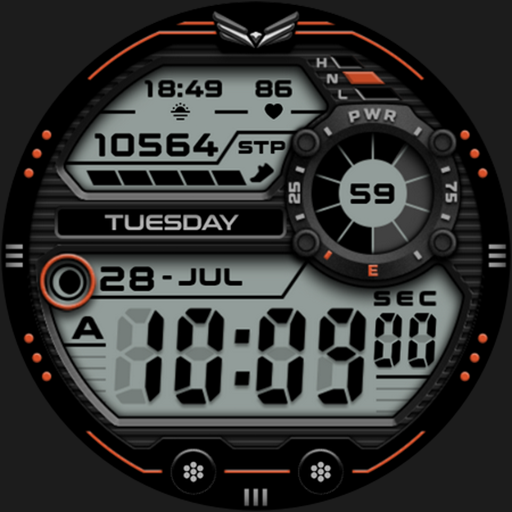
W6 Field Watch Face Wear OS 5+ Android
W6 Field Watch Face Wear OS 5+ is #184 in Watch Faces Grossing on Google Play in India and charting in 9 of 23 countries we track.
Updated 25 Oct 2026 · rankings refresh through the day
DeveloperOQ Watchfaces
CategoryPersonalization
Price1.79 USD
Released
Installs10k+
Rating★ 5.0 (163)
Updated
Content ratingEveryone
Rating
5.0 ★
163 ratings
Measured
Best rank now
#184
 Watch Faces Grossing
Measured
W6 Field Watch Face Wear OS 5+ on Google Play
App details
App ID
com.watchfacestudio.w6f
Publisher
OSMAN QADIR
Publisher country
Pakistan
Content rating
Everyone
W6 Field Watch Face Wear OS 5+ downloads
Worldwide, per day, and installs to date. The band is open; the exact number is free with an account.
How this is calculated
Google Play shows an exact lifetime install count; downloads per day are its daily change (measured). When Play hasn't refreshed the count, they come from new ratings and Top Free chart positions. Confidence is the chance the real number is within half to double ours.
Where W6 Field Watch Face Wear OS 5+'s downloads come from Modelled
Last 30 days: organic search, browsing the store, features and paid ads.
Active users
All platforms, worldwide. Free with an account.
Stickiness (DAU / MAU)
how many monthly users open it on a given day
How this is calculated
Monthly users come from lifetime installs across every store, fitted on monthly active user figures companies publish; daily users = monthly × the typical daily/monthly ratio for the category. Confidence is the chance the real number is within half to double ours.
Where it ranks on Google Play
Every top 200 chart it appears in across 23 countries.
| Country | Charts | Rank |
|---|---|---|
| India | Watch FacesGrossing | #184 |
 Mexico Mexico | Watch FacesGrossing | #186 |
 Saudi Arabia Saudi Arabia | Watch FacesGrossing | #181 |
 Indonesia Indonesia | Watch FacesGrossing | #185 |
 Netherlands Netherlands | Watch FacesGrossing | #185 |
 Turkey Turkey | Watch FacesGrossing | #185 |
 United Arab Emirates United Arab Emirates | Watch FacesGrossing | #186 |
 Thailand Thailand | Watch FacesGrossing | #183 |
 Vietnam Vietnam | Watch FacesGrossing | #183 |
Apps near W6 Field Watch Face Wear OS 5+ on the chart
Watch Faces Grossing, around #184.
 Minimal BOLD - Watch Face
#179
 Pixel Analog 2 Watch Face
#180
 Little Boo Halloween Animated
#181
 Breitling Premier Watch Face
#182
 Ballozi VERO 2 Hybrid Analog
#183
 BLZ ASTRA - Analog Watch Face
#185
 Ballozi TEMPUS Classic Chrono
#186
 Ballozi STEALTH MARINE 4 CL
#187
 MELT - Digital watch face
#188
 Ballozi TERAS - Hybrid Face
#189
Ratings
Google Play, worldwide.
Rating
5.0 ★
163 ratings
Measured
Ratings
163
Measured
Written reviews
17
Measured
About W6 Field Watch Face Wear OS 5+
=======================================================
FEATURES AND FUNCTIONS
======================================================
This watch face has following features:-
1. Tap on 6 o clock hour number to open watch Google Maps app.
2. Tap on 12 o clock hour number to open watch Google Play Store App.
3. Tap on 10 o clock hour number to open watch Battery app.
4. Tap on Date or Day Text to open watch Calendar app.
5. Tap on 2 o clock hour number to open watch Alarm app.
6. Tap on 4 o clock hour number to open watch settings app.
7. Different logos are available via customization menu.
8. Backgrounds:-
a. Non Gradient:- This is set by default . Non gradient backgrounds will change
color with main theme color styles you select. Option is available in
customization menu.
b. Gradient Backgrounds:- when selected from the customization menu option
these will be selected and they don't change color with main color styles. It is
important to turn them back to 1st to 0 setting in customization menu. To use
non gradient backgrounds again.
c. AoD Background:- Is fixed to pure black Background. and is not
affected by above selections.
9. Hour & Minutes Hands Color for Main Display can be switched off from customization Menu to make them full black.
10. Dim Modes are added as customization options for both Main and AoD separately in Customization menu.
FEATURES AND FUNCTIONS
======================================================
This watch face has following features:-
1. Tap on 6 o clock hour number to open watch Google Maps app.
2. Tap on 12 o clock hour number to open watch Google Play Store App.
3. Tap on 10 o clock hour number to open watch Battery app.
4. Tap on Date or Day Text to open watch Calendar app.
5. Tap on 2 o clock hour number to open watch Alarm app.
6. Tap on 4 o clock hour number to open watch settings app.
7. Different logos are available via customization menu.
8. Backgrounds:-
a. Non Gradient:- This is set by default . Non gradient backgrounds will change
color with main theme color styles you select. Option is available in
customization menu.
b. Gradient Backgrounds:- when selected from the customization menu option
these will be selected and they don't change color with main color styles. It is
important to turn them back to 1st to 0 setting in customization menu. To use
non gradient backgrounds again.
c. AoD Background:- Is fixed to pure black Background. and is not
affected by above selections.
9. Hour & Minutes Hands Color for Main Display can be switched off from customization Menu to make them full black.
10. Dim Modes are added as customization options for both Main and AoD separately in Customization menu.
What's new
V1.0.4 Change Log:-
1. All instances of wear os logo removed from watch face, previews as well as Phone companion app.
2. New Improved Companion app.
3.Watch face bundle updated to Target min SDK 34 as required by Google with latest Samsung Watch face Studio Version 1.8.10.
4.Watch face Companion App updated with latest Google Android Studio Narwhal 2025.1.1 as required by Google.
1. All instances of wear os logo removed from watch face, previews as well as Phone companion app.
2. New Improved Companion app.
3.Watch face bundle updated to Target min SDK 34 as required by Google with latest Samsung Watch face Studio Version 1.8.10.
4.Watch face Companion App updated with latest Google Android Studio Narwhal 2025.1.1 as required by Google.
Store changes
What W6 Field Watch Face Wear OS 5+ changed on its store page: name, icon, screenshots, price, size, languages, requirements.
Price rise
0.25 USD → 1.79 USD
Price drop
1.69 USD → 0.25 USD
Price rise
0.29 USD → 1.69 USD