
WIN - Super Hybrid SP Android
WIN - Super Hybrid SP is #136 in Watch Faces Grossing on Google Play in India and charting in 9 of 23 countries we track.
Updated 25 Oct 2026 · rankings refresh through the day
DeveloperWinWatchfaces
CategoryPersonalization
Price1.49 USD
Released
Installs1k+
Rating–
Updated
Content ratingEveryone
Best rank now
#136
 Watch Faces Grossing
Measured
WIN - Super Hybrid SP on Google Play
App details
App ID
com.watchfacestudio.winsuperHybridsp
Publisher
Филатов Игорь Александрович
Publisher country
Kazakhstan
Content rating
Everyone
WIN - Super Hybrid SP downloads
Worldwide, per day, and installs to date. The band is open; the exact number is free with an account.
How this is calculated
Google Play shows an exact lifetime install count; downloads per day are its daily change (measured). When Play hasn't refreshed the count, they come from new ratings and Top Free chart positions. Confidence is the chance the real number is within half to double ours.
Where WIN - Super Hybrid SP's downloads come from Modelled
Last 30 days: organic search, browsing the store, features and paid ads.
Active users
All platforms, worldwide. Free with an account.
Stickiness (DAU / MAU)
how many monthly users open it on a given day
How this is calculated
Monthly users come from lifetime installs across every store, fitted on monthly active user figures companies publish; daily users = monthly × the typical daily/monthly ratio for the category. Confidence is the chance the real number is within half to double ours.
Where it ranks on Google Play
Every top 200 chart it appears in across 23 countries.
 Mexico
 Saudi Arabia
 Indonesia
 Netherlands
 Turkey
 United Arab Emirates
 Thailand
 Vietnam
Apps near WIN - Super Hybrid SP on the chart
Watch Faces Grossing, around #136.
 Rolex Daytona watch face
#131
 Minimal Dial Watch Face
#132
 EVR104 Square & Round Face
#133
 TVV Seasonal Watch Face
#134
 GUERILLA - Analog watch face
#135
 Gothic Halloween Watch Face
#137
 FLW095 Fall Season Time
#138
 Ballozi LEGANCE Classic Luxury
#139
 WIN Classic Black Watch Face
#140
 Pumpkin Steps fall watch face
#141
About WIN - Super Hybrid SP
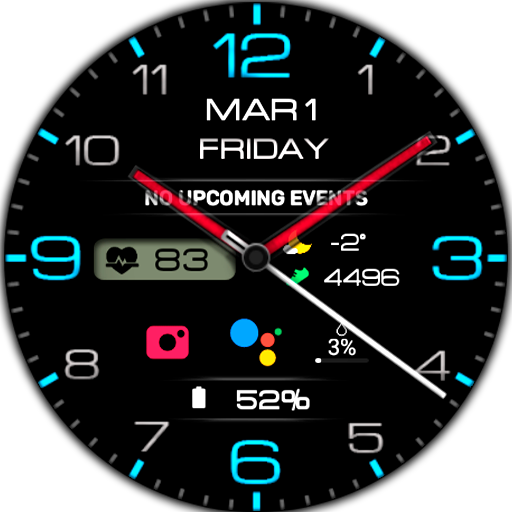
Super Hybrid SPORT - Informative watch face for everyday use
Stay on top of things with this dynamic hybrid watch face that combines analog style with digital information!
Quick Features:
- Digital + analog time display 12 or 24 hour digital watch format
- Custom complications
- Battery level
- Bold informative numbers for quick reading
- Smooth carbon fiber background for a sporty look (can be changed to others in the settings)
- A high resolution
- 4 custom complications
- color settings more than 20 colors
- Ability to turn off hour, minute and second hands
- Change the color of the arrows
- AOD mode
Perfect for active users who want a stylish and functional Wear OS experience!
Compatible with Wear OS devices running API level 30 and above, including Samsung Galaxy Watch 4, 5, 6, 7, 8 and Pixel Watch.
**Installation**
1. Install the watch face app on your phone.
2. Make sure your Wear OS watch is connected to your phone and uses the same Google account.
3. Select your watch as the installation device and complete the installation.
4. After installation, select the watch face from your watch face gallery.
If installation is delayed, check the internet connection on both devices, wait a minute or two, or restart your watch and try again.
**Customization**
• Touch and hold the watch face, then tap **Customize** to access the available settings.
• For the best experience, we recommend configuring the watch face directly on your watch. Video guide:
https://youtu.be/YPcpvbxABiA
**Support**
If you have any questions or installation issues, please contact: [email protected]
**More watch faces by WIN**
Explore other watch faces:
https://play.google.com/store/apps/dev?id=6789054753742990227
Stay on top of things with this dynamic hybrid watch face that combines analog style with digital information!
Quick Features:
- Digital + analog time display 12 or 24 hour digital watch format
- Custom complications
- Battery level
- Bold informative numbers for quick reading
- Smooth carbon fiber background for a sporty look (can be changed to others in the settings)
- A high resolution
- 4 custom complications
- color settings more than 20 colors
- Ability to turn off hour, minute and second hands
- Change the color of the arrows
- AOD mode
Perfect for active users who want a stylish and functional Wear OS experience!
Compatible with Wear OS devices running API level 30 and above, including Samsung Galaxy Watch 4, 5, 6, 7, 8 and Pixel Watch.
**Installation**
1. Install the watch face app on your phone.
2. Make sure your Wear OS watch is connected to your phone and uses the same Google account.
3. Select your watch as the installation device and complete the installation.
4. After installation, select the watch face from your watch face gallery.
If installation is delayed, check the internet connection on both devices, wait a minute or two, or restart your watch and try again.
**Customization**
• Touch and hold the watch face, then tap **Customize** to access the available settings.
• For the best experience, we recommend configuring the watch face directly on your watch. Video guide:
https://youtu.be/YPcpvbxABiA
**Support**
If you have any questions or installation issues, please contact: [email protected]
**More watch faces by WIN**
Explore other watch faces:
https://play.google.com/store/apps/dev?id=6789054753742990227
What's new
Wear OS Update - New Colors Added