Adjust Perspective
遠近補正カメラ
Not in any tracked top chart right now.
Updated 23 Oct 2026 · rankings refresh through the day
DeveloperMasanori Katsuta
CategoryPhoto & Video
Price150 JPY
Released
Rating★ 2.2 (12)
Version1.0.3
Age rating4+
First seen by us 1 Oct 2026
1 Oct 2026Installs (est.)500+ worldwide
Rating
2.2 ★
12 ratings
Measured
Adjust Perspective on the App Store
App details
App ID
1459794742
Publisher
Masanori Katsuta
On the store since
Apr 2019
7 years on the store
Minimum OS
iOS 12.0+
iPhone 5s and later
Devices
iPhone · iPad
Universal purchase
Content rating
4+
Languages
2
EN JA
Size
1 MB
Also listed in
Graphics & Design
Adjust Perspective downloads
Worldwide, per day, and installs to date. The band is open; the exact number is free with an account.
How this is calculated
Apple publishes no download counts. iPhone downloads come from chart positions and daily rating growth per country, calibrated on Google Play install counts; lifetime installs from ratings worldwide × installs per rating. Confidence is the chance the real number is within half to double ours.
Active users
All platforms, worldwide. Free with an account.
Stickiness (DAU / MAU)
how many monthly users open it on a given day
How this is calculated
Monthly users come from lifetime installs across every store, fitted on monthly active user figures companies publish; daily users = monthly × the typical daily/monthly ratio for the category. Confidence is the chance the real number is within half to double ours.
Where it ranks now
Every top chart it appears in across 30 countries.
| Country | Charts | Rank |
|---|---|---|
| Not charting right now. | ||
Ratings
App Store, worldwide.
Rating
2.2 ★
12 ratings
Measured
Ratings
12
Measured
About Adjust Perspective
This is a camera app that corrects distortion and perspective of photos.
Whole photo, Documents, posters, arts such as paintings and calligraphy, exhibits, screens, blackboards, whiteboards, signs, screens, timetables, etc.
You may want to leave a photo as a memo by taking photos with your smartphone camera or tablet camera.
The problem is that the image of the picture is distorted by the influence of the camera lens.
Even if the subject is at a right angle, it will not be a right angle photo.
If the subject is rectangular, it will be a quadrangle with perspective.
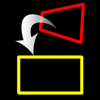
You can convert such perspective distorted quadrangle to the original subject rectangle.
Cut out a free-form quadrangle from the photo and convert it to a rectangle.
The cropping quadrangle does not have to be a right angle, and it is OK to use a trapezoid, a rhombus, a parallelogram, or a freeform quadrangle.
If you can not shoot the subject directly in front of you, the photos will have perspective.
To be precise, even if taken straight ahead, some distortion is inevitable.
However, with this app, even photos taken from an oblique direction can be converted to rectangular images viewed from the front.
You can edit the position of the corner mark for clipping while checking the clipping image on the preview screen in real time.
Material picture
- Photographing (camera)
- Selection of photo (camera roll)
Save cropped image
- Save image (Camera roll)
- Image sharing (Twitter, Facebook, LINE, Dropbox etc.)
Cropped image settings
- 4 corner marks for clipping (movement by drag operation)
- The amount of movement of the corner mark
- aspect ratio
- Horizontal perspective correction
- Vertical perspective correction
- Resolution of saved image
Whole photo, Documents, posters, arts such as paintings and calligraphy, exhibits, screens, blackboards, whiteboards, signs, screens, timetables, etc.
You may want to leave a photo as a memo by taking photos with your smartphone camera or tablet camera.
The problem is that the image of the picture is distorted by the influence of the camera lens.
Even if the subject is at a right angle, it will not be a right angle photo.
If the subject is rectangular, it will be a quadrangle with perspective.
You can convert such perspective distorted quadrangle to the original subject rectangle.
Cut out a free-form quadrangle from the photo and convert it to a rectangle.
The cropping quadrangle does not have to be a right angle, and it is OK to use a trapezoid, a rhombus, a parallelogram, or a freeform quadrangle.
If you can not shoot the subject directly in front of you, the photos will have perspective.
To be precise, even if taken straight ahead, some distortion is inevitable.
However, with this app, even photos taken from an oblique direction can be converted to rectangular images viewed from the front.
You can edit the position of the corner mark for clipping while checking the clipping image on the preview screen in real time.
Material picture
- Photographing (camera)
- Selection of photo (camera roll)
Save cropped image
- Save image (Camera roll)
- Image sharing (Twitter, Facebook, LINE, Dropbox etc.)
Cropped image settings
- 4 corner marks for clipping (movement by drag operation)
- The amount of movement of the corner mark
- aspect ratio
- Horizontal perspective correction
- Vertical perspective correction
- Resolution of saved image
Latest updates
1.0.3
- The drawing process has been sped up.
- Compatible with safe areas.
- Fixed mark movement processing.