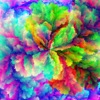
Bloom. Downloads & RevenueBloom. · App Store
Not in any tracked top chart right now.
Updated 6 Nov 2026 · rankings refresh through the day
DeveloperLimit Point Software
CategoryGraphics & Design
PriceFree
Released
Rating★ 5.0 (2)
Version1.0.4
Age rating4+
First seen by us 23 Oct 2026
Full timeline · 3 events
- 🆕Bloom. first spotted by AppInsiderUnited States (found via developer)
- 📦Bloom. version 1.0.4Enhanced music playing support: A list of all available music tracks is available in the Music tab to enable switching between them easily. Also, the app integrates with the system media player to display current track playing, and supports the system media commands to change tracks.
Previous versions:
Many new output options, including drawing generated images on the surface of various 3D shapes, larger sized blooms, save 'Sphere' documents to preserve configuration information for 3D shape rendering. And best of all: the app now includes a Music Manager to optionally listen to an assortment of music tracks while you wait and watch the art generate.… more - 🆕Bloom. released on the App Store
Collected from the stores by AppInsider since we first spotted the app. Dates are when we saw each change.
Rating
5.0 ★
2 ratings
Measured
Bloom. on the App Store
App details
App ID
844582063
Publisher
Limit Point Software
On the store since
May 2023
3 years on the store
Minimum OS
iOS 16.4+
iPhone 8 and later
Devices
iPhone · iPad
Universal purchase
Content rating
4+
Languages
1
EN
Size
164 MB
Also listed in
Education
Where it ranks now
Every top chart it appears in across 30 countries.
| Country | Charts | Rank |
|---|---|---|
| Not charting right now. | ||
Ratings
App Store, worldwide.
Rating
5.0 ★
2 ratings
Measured
Ratings
2
Measured
About Bloom.
Bloom is an app that generates computational art, which means images are created by algorithms rather than by hand, but users can customize parameters to influence the results. In Bloom, textures can be generated so that every pixel has a unique color. Bloom is available for macOS and iOS, in a virtually identical experience.
To give every pixel in an N×N grid its own unique RGB color, we need enough color variations. With M shades per color channel (red, green, blue), we get M³ total colors. So we choose M so that M³ matches the number of pixels, N²:
N² = M³
This algorithm produces endlessly varied patterns that can be applied to a variety of 3D shapes.
Feature overview:
• Self-generating, pseudo-random process creates unique patterns of a rainbow of colors.
• 1000x1000 dimension color profusions consisting of one million different colored pixels, with option of more or less.
• Apply generated images, or any other image, as textures on 3D shapes - sphere, cube, heart and more.
• Listen to our own in-house music as you watch and wait.
Many 3D output options, including texture filters, shape rotation, material and lighting properties. A presets menu provides you with several sets of parameter values that you can start with and then tweak further. Use the Defaults menu item to reset all parameters to the state of Bloom on first launch.
Options can be saved to and reloaded from Bloom Documents, using the Share menu. Bloom Documents are created using the Share menu item Save Bloom Sphere Document, and reloaded using the Share menu item Load Bloom Document. Bloom Documents support Quick Look Thumbnails. Quick Look thumbnails are small preview images that the operating system generates for files so you can see what’s inside without opening them. For example, when you browse your files in Finder, each Bloom Document or image may have a tiny preview showing the content or a miniature version of the 3D shape and texture. This makes it easier to identify files at a glance and quickly find what you’re looking for.
Available shape geometries: sphere, torus, cube, cylinder, plane, capsule, pyramid, star, trefoil knot, exclamation heart and heart.
A Music Manager enables listening to an assortment of music tracks while you wait and watch the art generate.
Latest updates
1.0.4
Enhanced music playing support: A list of all available music tracks is available in the Music tab to enable switching between them easily. Also, the app integrates with the system media player to display current track playing, and supports the system media commands to change tracks.
Previous versions:
Many new output options, including drawing generated images on the surface of various 3D shapes, larger sized blooms, save 'Sphere' documents to preserve configuration information for 3D shape rendering. And best of all: the app now includes a Music Manager to optionally listen to an assortment of music tracks while you wait and watch the art generate.
More from Limit Point Software
 Gravity - Augmented Reality
 Agenda - To Do, Lists, & Tasks
 Grapes - Scales & Chords
 Cloud Music Player+
 Patterns - Personal Analytics
 Glow Draw.
 Spectra - Video & Audio to Art
 URL to Photo
 Intervals - Timer for Workouts (Tabata, HIIT, etc)
 Snake ■
 Photo Cube - Animated Art
 Face Edit - Selfie Editor, Retouch, & Tune