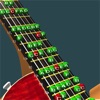
Guitar Scales 3D
Not in any tracked top chart right now.
Updated 25 Oct 2026 · rankings refresh through the day
DeveloperPhilip Broder
CategoryMusic
PriceFree
Released
Rating★ 5.0 (2)
Version1.3
Age rating4+
First seen by us 24 Oct 2026
24 Oct 2026Rating
5.0 ★
2 ratings
Measured
Guitar Scales 3D on the App Store
App details
App ID
1212569697
Publisher
Philip Broder
On the store since
Apr 2017
9 years on the store
Minimum OS
iOS 10.0+
iPhone 5 and later
Devices
iPhone · iPad
Universal purchase
Content rating
4+
Languages
1
EN
Size
117 MB
Also listed in
Education
Where it ranks now
Every top chart it appears in across 30 countries.
| Country | Charts | Rank |
|---|---|---|
| Not charting right now. | ||
Ratings
App Store, worldwide.
Rating
5.0 ★
2 ratings
Measured
Ratings
2
Measured
About Guitar Scales 3D
See and learn from guitar scales on screen exactly as you are seeing them on your guitar, in 3D.
Hear the notes played and highlighted in real time as you play along, change the tempo, loop, reverse, 1 or 2 octaves.
Select the picking pattern used for playing the scales, ramp up the bpm, play along and nail those exercise patterns.
Select from different guitar sounds, Acoustic, Electric, Pam Muted.
Many beginners find it difficult to translate the flat image of a guitar scale diagram from the page on to what they are seeing as they look down at their own hand on the guitar neck from above. With Guitar Scales 3D you can adjust the view to exactly match what you are seeing.
Includes a growing library of Picking Exercises to build up your Alternate Picking Chops.
Start off slow and crank up the bpm until you're shredding with the best of them.
The exercise work on left-right hand synchronisation as well as common positions and patterns
Touch/Drag with 1-finger to rotate the guitar neck in 3D space.
Touch/Drag with 2-fingers to change position up/down, pinch/zoom, and rotate.
With the Key/Scale Dial at the bottom left of the screen you can change the key and select from the available scales. Seeing the scale notes move on the neck gives an extra insight into the diffences between the scales.
When selecting a scale you will see the note names, the scale formula, and the note intervals of the scale.
This is the start of a much larger project vision, give me feedback of features you would love to see, what works well, and what doesn't. Features to come include: more scales, animated exercise patterns, more guitar body styles, chord library.
Hear the notes played and highlighted in real time as you play along, change the tempo, loop, reverse, 1 or 2 octaves.
Select the picking pattern used for playing the scales, ramp up the bpm, play along and nail those exercise patterns.
Select from different guitar sounds, Acoustic, Electric, Pam Muted.
Many beginners find it difficult to translate the flat image of a guitar scale diagram from the page on to what they are seeing as they look down at their own hand on the guitar neck from above. With Guitar Scales 3D you can adjust the view to exactly match what you are seeing.
Includes a growing library of Picking Exercises to build up your Alternate Picking Chops.
Start off slow and crank up the bpm until you're shredding with the best of them.
The exercise work on left-right hand synchronisation as well as common positions and patterns
Touch/Drag with 1-finger to rotate the guitar neck in 3D space.
Touch/Drag with 2-fingers to change position up/down, pinch/zoom, and rotate.
With the Key/Scale Dial at the bottom left of the screen you can change the key and select from the available scales. Seeing the scale notes move on the neck gives an extra insight into the diffences between the scales.
When selecting a scale you will see the note names, the scale formula, and the note intervals of the scale.
This is the start of a much larger project vision, give me feedback of features you would love to see, what works well, and what doesn't. Features to come include: more scales, animated exercise patterns, more guitar body styles, chord library.
Latest updates
1.3
Now with a growing library of Picking Exercises to build up your Alternate Picking Chops.
Start off slow and crank up the bpm until you're shredding with the best of them.
The exercise work on left-right hand synchronisation as well as common positions and patterns.
Take advantage of the new notification system at 1, 3, or 7, day intervals to keep your practice on track.
More from Philip Broder
 RPM - Turntable Speed Accuracy
 GLASSES - Reading Magnifier
 SetBoss - Manage your band's setlists and create multi-track demo ideas.
 Level17 The Accelerometer Game
 ATX Trail - never get lost or thirsty on Austin's Town Lake trail ever again.
 Lissajous Play - Maths Art!
 Wow Flutter - RPM Testing
 Sensor Play - Data Recorder
 Face Play: The AR Mask Creator
 Until Countdown & up to events
 RPM - Pro Turntable Accuracy