Pool Clock
Not in any tracked top chart right now.
Updated 28 Sep 2026 · rankings refresh through the day
DeveloperSohta Itoh
CategoryHealth & Fitness
Price150 JPY
Released
Rating★ 3.0 (2)
Version1.1.0
Age rating4+
First seen by us 25 Sep 2026
25 Sep 2026Rating
3.0 ★
2 ratings
Measured
Pool Clock on the App Store
App details
App ID
1462481623
Publisher
Sohta Itoh
Minimum OS
iOS 12.0+
iPhone 5s and later
Content rating
4+
Languages
9
EN FR DE IT JA KO ZH ES ZH
Size
3 MB
Where it ranks now
Every top chart it appears in across 24 countries.
| Country | Charts | Rank |
|---|---|---|
| Not charting right now. | ||
Ratings
App Store, worldwide.
Rating
3.0 ★
2 ratings
Measured
Ratings
2
Measured
About Pool Clock
Pool Clock is designed for interval-based training during swimming exercise.
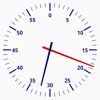
This app simply reproduces the traditional analog swimming pace clock found on the pool deck.
By placing your device or a TV monitor connected to the device at the poolside, you can start swimming workouts wherever you are.
Be careful to keep your electronic device waterproof when use it poolside.
*** Interval ***
With the interval function, you can easily track the interval on the pace clock.
Once you set the Interval Time, Iteration (the number of interval repetitions), and Preparation time (time before the first start), a small triangle appears on the outside of the dial of the clock to indicate the next start time.
*** Digital Clock ***
The digital clock can be displayed or hidden using the ON/OFF button in the menu.
The digital clock displays the current time of the device.
You can choose between 12-hour or 24-hour display.
*** Sound ***
You can turn on/off the countdown beep sound in the menu.
*** Notice ***
This app prevents the screen from turning off while it is open.
This app simply reproduces the traditional analog swimming pace clock found on the pool deck.
By placing your device or a TV monitor connected to the device at the poolside, you can start swimming workouts wherever you are.
Be careful to keep your electronic device waterproof when use it poolside.
*** Interval ***
With the interval function, you can easily track the interval on the pace clock.
Once you set the Interval Time, Iteration (the number of interval repetitions), and Preparation time (time before the first start), a small triangle appears on the outside of the dial of the clock to indicate the next start time.
*** Digital Clock ***
The digital clock can be displayed or hidden using the ON/OFF button in the menu.
The digital clock displays the current time of the device.
You can choose between 12-hour or 24-hour display.
*** Sound ***
You can turn on/off the countdown beep sound in the menu.
*** Notice ***
This app prevents the screen from turning off while it is open.
Latest updates
1.1.0
1.1.0 - Supports 12-hour format