Trends watch Downloads & RevenueTrends watch · App Store
Not in any tracked top chart right now.
Updated 9 Nov 2026 · rankings refresh through the day
DeveloperDC & Co.
CategoryProductivity
PriceFree
Released
Rating★ 4.3 (3)
Version1.2
Age rating4+
First seen by us 23 Oct 2026
Full timeline · 2 events in the last 12 months
- 🆕Trends watch first spotted by AppInsiderUnited States (found via developer)
- 🆕Trends watch released on the App Store
Collected from the stores by AppInsider since we first spotted the app. Dates are when we saw each change.
Rating
4.3 ★
3 ratings
Measured
Trends watch on the App Store
App details
App ID
991942874
Publisher
Darren Chi
On the store since
May 2015
11 years on the store
Minimum OS
iOS 7.0+
Devices
iPhone · iPad
Universal purchase
Content rating
4+
Languages
1
EN
Size
15 MB
Also listed in
Utilities
Where it ranks now
Every top chart it appears in across 30 countries.
| Country | Charts | Rank |
|---|---|---|
| Not charting right now. | ||
Ratings
App Store, worldwide.
Rating
4.3 ★
3 ratings
Measured
Ratings
3
Measured
About Trends watch
"Trends" helps you keep track of things that happen on a daily basis so you can see how they affect you over time or how you can improve your life based on those events.
You might have a habit you want to break and want to track your progress in eliminating the habit. Maybe you have something you want to do more often, such as exercise, and want to see on a week to week basis whether you are actually achieving your goal.
"Trends" is flexible and versatile enough to serve a variety of different purposes. Perhaps you want to track good days and bad days or whether you are getting enough sleep each day.
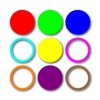
Simply choose a color and name for each type of event you want to track, collectively called a "trend". Then on a daily basis, if the event happens, tap the colored circle to mark it for that day. Additionally, each daily marking of a trend can have an associated number, which can be used to rate the event or count the number of times the event happened that day. Tap the marker equal to the number you want, up to nine.
Colored marks make it easy to see whether something happened or not. Month views provide a quick way to see how trends change or do not change over time. Drill down to each day for the details.
Latest updates
1.2
Added Apple Watch app components.