
Digital Watch Face D36 Downloads & RevenueDigital Watch Face D36 · Google Play
41 days old
Digital Watch Face D36 is #196 in Watch Faces Grossing on Google Play in India and charting in 9 of 23 countries we track.
Updated 8 Nov 2026 · rankings refresh through the day
DeveloperVG Faces
CategoryPersonalization
Price1.69 USD
Released
Installs100+
Rating–
Updated
Content ratingEveryone
Digital Watch Face D36 update history & changes
Last change · 7 events since 28 Sep 2026Full timeline ↓💰Price rise📈Entered the top 100 in 8 charts📈Entered the top 100 in 10 charts🆕First spotted by AppInsider🆕Its developer released another app: Weather 5 Forecast Watch Face
Full timeline · 7 events
- 💰Digital Watch Face D36: price rise0.59 USD → 1.69 USD · US
- 📈Digital Watch Face D36 entered the top 100 in 8 chartsTop Paid · Wear OS · AE · Top Paid · Wear OS · ID · Top Paid · Wear OS · IN · Top Paid · Watch Faces · MX · +4 more
- 📈Digital Watch Face D36 entered the top 100 in 10 chartsTop Paid · Watch Faces · AE · Top Paid · Watch Faces · ID · Top Paid · Watch Faces · IN · Top Paid · Wear OS · MX · +6 more
- 📈Digital Watch Face D36 charting in a new country in 5 chartsMexico · Netherlands · Thailand · Turkey · +1 more
- 🆕Digital Watch Face D36 first spotted by AppInsiderIndia
- 🆕Digital Watch Face D36: its developer released another app: Weather 5 Forecast Watch Face
- 🆕Digital Watch Face D36 released on Google Play
Collected from the stores by AppInsider since we first spotted the app. Dates are when we saw each change.
Best rank now
#196
 Watch Faces Grossing
Measured
Digital Watch Face D36 on Google Play
App details
App ID
com.vgfaces.d36
Publisher
Volodymyr Gadiatskyi
Publisher country
Germany
Content rating
Everyone
Digital Watch Face D36 downloads
Worldwide, per day, and installs to date. The band is open; the exact number is free with an account.
How this is calculated
Google Play shows an exact lifetime install count; downloads per day are its daily change (measured). When Play hasn't refreshed the count, they come from new ratings and Top Free chart positions. Confidence is the chance the real number is within half to double ours.
Where Digital Watch Face D36's downloads come from Modelled
Last 30 days: organic search, browsing the store, features and paid ads.
Where it ranks on Google Play
Every top 200 chart it appears in across 23 countries.
| Country | Charts | Rank |
|---|---|---|
| India | Watch FacesGrossing | #196 |
| India | Watch FacesPaid | #102 |
| India | Wear OSPaid | #109 |
 Mexico | Watch FacesGrossing | #195 |
| Mexico | Watch FacesPaid | #98 |
| Mexico | Wear OSPaid | #105 |
 Indonesia | Watch FacesGrossing | #197 |
| Indonesia | Watch FacesPaid | #95 |
 Saudi Arabia | Watch FacesGrossing | #200 |
| Saudi Arabia | Watch FacesPaid | #97 |
| Saudi Arabia | Wear OSPaid | #104 |
| Indonesia | Wear OSPaid | #105 |
| India | PersonalizationPaid | #192 |
 Turkey | Watch FacesPaid | #93 |
 Netherlands | Watch FacesGrossing | #196 |
 United Arab Emirates | Watch FacesGrossing | #200 |
| Turkey | Watch FacesGrossing | #200 |
| United Arab Emirates | Watch FacesPaid | #100 |
| Netherlands | Watch FacesPaid | #103 |
| Turkey | Wear OSPaid | #105 |
| Netherlands | Wear OSPaid | #113 |
| United Arab Emirates | Wear OSPaid | #114 |
| Indonesia | PersonalizationPaid | #196 |
 Thailand | Watch FacesGrossing | #196 |
| Saudi Arabia | PersonalizationPaid | #197 |
| Thailand | Watch FacesPaid | #103 |
| Thailand | Wear OSPaid | #115 |
 Vietnam | Watch FacesPaid | #92 |
| Vietnam | Watch FacesGrossing | #196 |
| Vietnam | Wear OSPaid | #102 |
| Turkey | PersonalizationPaid | #196 |
| Vietnam | PersonalizationPaid | #197 |
Apps near Digital Watch Face D36 on the chart
Watch Faces Grossing, around #196.
 LUMINOR PANERAI Watch face
#190
 Breitling Premier Watch Face
#191
 W6 Field Watch Face Wear OS 5+
#192
 Ballozi STEALTH MARINE 4 CL
#193
 BLZ ASTRA - Analog Watch Face
#194
 Ballozi TEMPUS Classic Chrono
#195
 MELT - Digital watch face
#197
 MJ137 Suit it Up
#198
 ML2U 276b Digital Hybrid
#199
 Ballozi VERO 2 Hybrid Analog
#200
About Digital Watch Face D36
Troubleshooting Tips:
• Incorrect progress bar color: Re-select the same data type (e.g., Steps or Calories) in the watch face customize settings. (Common on Pixel Watch with Fitbit)
• Weather not updating/showing: Switch to another watch face and then switch back.
Note: These are known Google/Wear OS system bugs that watch face developers cannot fix.
D36 Digital Watch Face for Wear OS
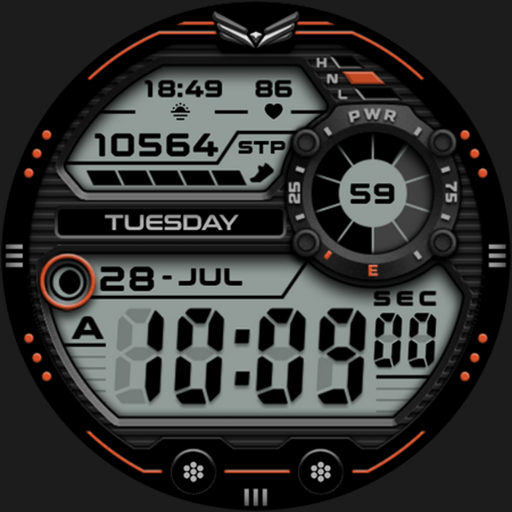
Upgrade your smartwatch with the D36 Digital Watch Face for Wear OS. This sleek, modern digital design offers a clean layout perfectly balancing minimalist aesthetics with extensive customization and essential everyday functionality.
Key Features:
• Advanced Time Display: The digital clock automatically syncs with your phone's 12/24-hour settings, featuring an AM/PM indicator for 12-hour mode and a toggleable leading zero (enabled by default).
• 6 Customizable Complications: Take full control of your display with six dedicated slots, including two stylish progress bars, for the information you value most.
• Detailed Weather: View current conditions with intuitive Day & Night weather icons perfectly integrated into the dial.
• Complete Date: Keep track of your schedule with a full date display that includes the day of the week and the month.
• Extensive Color Themes: Match your style effortlessly by choosing from a large selection of vibrant color themes.
• Always On Display: Manage your battery life with a sleek, minimalist, and battery-efficient AOD mode.
Installation:
1. Ensure your watch is connected via Bluetooth.
2. Download from the Google Play Store.
3. Long-press your watch screen, scroll to the end, and select the watch face to apply.
Compatibility:
Designed exclusively for Wear OS 5+ devices, including:
• Samsung Galaxy Watch 8 & Ultra
• Google Pixel Watch 4
• And other newer devices running Wear OS 5 or higher.
• Incorrect progress bar color: Re-select the same data type (e.g., Steps or Calories) in the watch face customize settings. (Common on Pixel Watch with Fitbit)
• Weather not updating/showing: Switch to another watch face and then switch back.
Note: These are known Google/Wear OS system bugs that watch face developers cannot fix.
D36 Digital Watch Face for Wear OS
Upgrade your smartwatch with the D36 Digital Watch Face for Wear OS. This sleek, modern digital design offers a clean layout perfectly balancing minimalist aesthetics with extensive customization and essential everyday functionality.
Key Features:
• Advanced Time Display: The digital clock automatically syncs with your phone's 12/24-hour settings, featuring an AM/PM indicator for 12-hour mode and a toggleable leading zero (enabled by default).
• 6 Customizable Complications: Take full control of your display with six dedicated slots, including two stylish progress bars, for the information you value most.
• Detailed Weather: View current conditions with intuitive Day & Night weather icons perfectly integrated into the dial.
• Complete Date: Keep track of your schedule with a full date display that includes the day of the week and the month.
• Extensive Color Themes: Match your style effortlessly by choosing from a large selection of vibrant color themes.
• Always On Display: Manage your battery life with a sleek, minimalist, and battery-efficient AOD mode.
Installation:
1. Ensure your watch is connected via Bluetooth.
2. Download from the Google Play Store.
3. Long-press your watch screen, scroll to the end, and select the watch face to apply.
Compatibility:
Designed exclusively for Wear OS 5+ devices, including:
• Samsung Galaxy Watch 8 & Ultra
• Google Pixel Watch 4
• And other newer devices running Wear OS 5 or higher.
What's new
app-release
Store changes
What Digital Watch Face D36 changed on its store page: name, icon, screenshots, price, size, languages, requirements.
Price rise
0.59 USD → 1.69 USD