
S4U Cyberpunk watch face Android
S4U Cyberpunk watch face is #108 in Watch Faces Paid on Google Play in India and charting in 9 of 23 countries we track.
Updated 25 Oct 2026 · rankings refresh through the day
Developerstyles4you
CategoryPersonalization
Price1.49 USD
Released
Installs5k+
Rating★ 4.2 (118)
Updated
Content ratingEveryone
Rating
4.2 ★
118 ratings
Measured
Best rank now
#108
 Watch Faces Paid
Measured
S4U Cyberpunk watch face on Google Play
App details
App ID
com.watchfacestudio.s4ucyberpunk
Publisher
Matthias Adler
Publisher country
Germany
Content rating
Everyone
S4U Cyberpunk watch face downloads
Worldwide, per day, and installs to date. The band is open; the exact number is free with an account.
How this is calculated
Google Play shows an exact lifetime install count; downloads per day are its daily change (measured). When Play hasn't refreshed the count, they come from new ratings and Top Free chart positions. Confidence is the chance the real number is within half to double ours.
Where S4U Cyberpunk watch face's downloads come from Modelled
Last 30 days: organic search, browsing the store, features and paid ads.
Active users
All platforms, worldwide. Free with an account.
Stickiness (DAU / MAU)
how many monthly users open it on a given day
How this is calculated
Monthly users come from lifetime installs across every store, fitted on monthly active user figures companies publish; daily users = monthly × the typical daily/monthly ratio for the category. Confidence is the chance the real number is within half to double ours.
Where it ranks on Google Play
Every top 200 chart it appears in across 23 countries.
| Country | Charts | Rank |
|---|---|---|
| India | Watch FacesPaid | #108 |
| India | Wear OSPaid | #113 |
 Mexico Mexico | Watch FacesPaid | #100 |
| Mexico | Wear OSPaid | #120 |
 Saudi Arabia Saudi Arabia | Watch FacesPaid | #108 |
 Indonesia Indonesia | Watch FacesPaid | #108 |
| Saudi Arabia | Wear OSPaid | #115 |
| Indonesia | Wear OSPaid | #119 |
 United Arab Emirates United Arab Emirates | Watch FacesPaid | #99 |
 Turkey Turkey | Watch FacesPaid | #102 |
 Netherlands Netherlands | Watch FacesPaid | #104 |
| United Arab Emirates | Wear OSPaid | #113 |
| Netherlands | Wear OSPaid | #113 |
| Turkey | Wear OSPaid | #113 |
| Saudi Arabia | PersonalizationPaid | #188 |
| Indonesia | PersonalizationPaid | #193 |
 Thailand Thailand | Watch FacesPaid | #100 |
| Thailand | Wear OSPaid | #126 |
 Vietnam Vietnam | Watch FacesPaid | #100 |
| Turkey | PersonalizationPaid | #187 |
| Netherlands | PersonalizationPaid | #188 |
| Vietnam | Wear OSPaid | #125 |
| Thailand | PersonalizationPaid | #198 |
| Vietnam | PersonalizationPaid | #189 |
Apps near S4U Cyberpunk watch face on the chart
Watch Faces Paid, around #108.




Ratings
Google Play, worldwide.
Rating
4.2 ★
118 ratings
Measured
Ratings
118
Measured
Written reviews
8
Measured
About S4U Cyberpunk watch face
****
⚠️ IMPORTANT: Compatibility
This is a Wear OS Watch Face app and supports only smartwatches running Wear OS 5 or higher (Wear OS API 34+).
Compatible devices include:
- Samsung Galaxy Watch 4, 5, 6, 7, 8 (incl. Ultra and Classic Versions)
- Google Pixel Watch 1–3
- Other Wear OS 5+ smartwatches
If you experience any issues with installation or downloading, even on a compatible smartwatch:
1. Open the companion app provided with your purchase.
2. Follow the steps in the Install/Issues section.
Still need help? Feel free to email me at [email protected] for support.
****
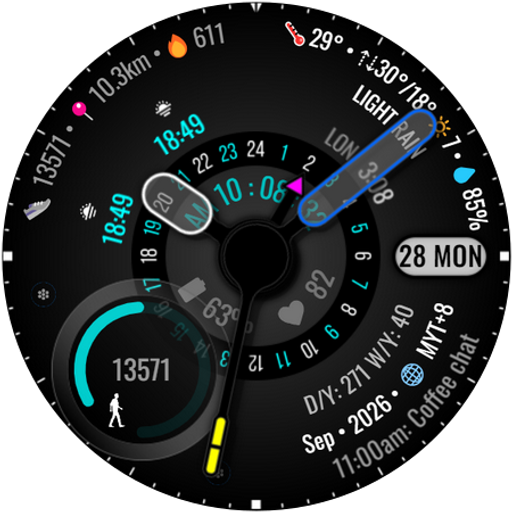
The S4U Chicago Cyberpunk is another extremely realistic analog watch face for your Wear OS Smartwatch. The extraordinary 3D effect gives you the feeling of wearing a real watch.
The watch face shows the time, your heart rate, your steps, your current battery status and the date (weekday, day of month). You will get multiple customization options. You are able to switch between different colors for the background, the index (inner or outside) and the hands. Colors can be combined. Check out the gallery for more information about the functionality
✨ Key Features:
- ultra realistic analog watch face
- multiple color options (index, background, hands, logo, optional index glow effect)
- 3 custom complications (change visible value)
- 5 individual shortcuts (reach your favorite app/widget with just one click)
***
🕒 Data Displayed:
Display in the right area:
+ battery status 0-100%
+ analog heart rate
Display in the left area:
+ analog pedometer (max. 49.999 Steps)
Display on bottom area:
+ Day and Weekday
+ 2 custom complications
***
🌙 Always-On Display (AOD)
The watch face has an always-on mode with 3 different brightness level. Also it comes with 3 different AOD Background Options. (shaded, soft shaded, pitch black).
Important Notes:
- Using AOD will reduce battery life, depending on your smartwatch's settings.
- Some smartwatches may automatically dim the AOD display based on ambient light conditions.
***
🎨 CUSTOMIZATION OPTIONS
1. Press and hold finger on the watch display.
2. Press the button "customize".
3. Swipe left or right to switch between the different customizable objects.
4. Swipe up or down to change the colors of the items.
Possible options: Color background (5 colors), Color Primary (6), Color Index Glow (7 incl. OFF), Color Hands (6), Border Shadow (4 incl. OFF), Color = Secondary Color, AOD Background (3), AOD Brightness (3)
***
⚙️ COMPLICATIONS & SHORTCUTS
Enhance your watch face with customizable app shortcuts and complications:
- App Shortcuts: Link to your favorite widgets for quick access.
- Editable Complications: Display the data you need most by customizing the visible values.
1. Press and hold the watch display.
2. Push the customize button.
3. Swipe from right to left until you reach the "complications".
4. 5 app shortcuts and 3 custom complications are highlighted. Click on them to make the desired settings.
That's it. :)
****
📬
⚠️ IMPORTANT: Compatibility
This is a Wear OS Watch Face app and supports only smartwatches running Wear OS 5 or higher (Wear OS API 34+).
Compatible devices include:
- Samsung Galaxy Watch 4, 5, 6, 7, 8 (incl. Ultra and Classic Versions)
- Google Pixel Watch 1–3
- Other Wear OS 5+ smartwatches
If you experience any issues with installation or downloading, even on a compatible smartwatch:
1. Open the companion app provided with your purchase.
2. Follow the steps in the Install/Issues section.
Still need help? Feel free to email me at [email protected] for support.
****
The S4U Chicago Cyberpunk is another extremely realistic analog watch face for your Wear OS Smartwatch. The extraordinary 3D effect gives you the feeling of wearing a real watch.
The watch face shows the time, your heart rate, your steps, your current battery status and the date (weekday, day of month). You will get multiple customization options. You are able to switch between different colors for the background, the index (inner or outside) and the hands. Colors can be combined. Check out the gallery for more information about the functionality
✨ Key Features:
- ultra realistic analog watch face
- multiple color options (index, background, hands, logo, optional index glow effect)
- 3 custom complications (change visible value)
- 5 individual shortcuts (reach your favorite app/widget with just one click)
***
🕒 Data Displayed:
Display in the right area:
+ battery status 0-100%
+ analog heart rate
Display in the left area:
+ analog pedometer (max. 49.999 Steps)
Display on bottom area:
+ Day and Weekday
+ 2 custom complications
***
🌙 Always-On Display (AOD)
The watch face has an always-on mode with 3 different brightness level. Also it comes with 3 different AOD Background Options. (shaded, soft shaded, pitch black).
Important Notes:
- Using AOD will reduce battery life, depending on your smartwatch's settings.
- Some smartwatches may automatically dim the AOD display based on ambient light conditions.
***
🎨 CUSTOMIZATION OPTIONS
1. Press and hold finger on the watch display.
2. Press the button "customize".
3. Swipe left or right to switch between the different customizable objects.
4. Swipe up or down to change the colors of the items.
Possible options: Color background (5 colors), Color Primary (6), Color Index Glow (7 incl. OFF), Color Hands (6), Border Shadow (4 incl. OFF), Color = Secondary Color, AOD Background (3), AOD Brightness (3)
***
⚙️ COMPLICATIONS & SHORTCUTS
Enhance your watch face with customizable app shortcuts and complications:
- App Shortcuts: Link to your favorite widgets for quick access.
- Editable Complications: Display the data you need most by customizing the visible values.
1. Press and hold the watch display.
2. Push the customize button.
3. Swipe from right to left until you reach the "complications".
4. 5 app shortcuts and 3 custom complications are highlighted. Click on them to make the desired settings.
That's it. :)
****
📬
What's new
Version (1.1.5) - Companion App
Minor fixes.
Minor fixes.