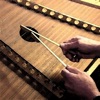
Trapezoid Downloads & RevenueTrapezoid - Hammered Dulcimer · App Store
Not in any tracked top chart right now.
Updated 11 Nov 2026 · rankings refresh through the day
DeveloperMichael Eskin
CategoryMusic
Price99.00 THB
Released
Rating★ 0.0 (0)
Version3.4
Age rating4+
First seen by us 1 Oct 2026
Trapezoid - Hammered Dulcimer update history & changes
Last change · 4 events since 14 Dec 2015Full timeline ↓Full timeline · 3 events in the last 12 months
- ✏️Trapezoid - Hammered Dulcimer: categories changed+ Education − MZGenre.Education − MZGenre.Music
- 🆕Trapezoid - Hammered Dulcimer first spotted by AppInsider#34 in Top Paid · All Apps · Thailand
- 🆕Trapezoid - Hammered Dulcimer released on the App Store
Collected from the stores by AppInsider since we first spotted the app. Dates are when we saw each change.
Rating
0.0 ★
0 ratings
Measured
Trapezoid - Hammered Dulcimer on the App Store
App details
App ID
1062108541
Publisher
Michael Eskin
On the store since
Dec 2015
10 years on the store
Minimum OS
iOS 10.0+
Devices
iPad
Content rating
4+
Languages
1
EN
Size
77 MB
Also listed in
Education
Where it ranks now
Every top chart it appears in across 30 countries.
| Country | Charts | Rank |
|---|---|---|
| Not charting right now. | ||
Ratings
App Store, worldwide.
Rating
0.0 ★
0 ratings
Measured
Ratings
0
Measured
About Trapezoid - Hammered Dulcimer
Trapezoid is an amazing Hammered Dulcimer for the iPad.
Written by an experienced Hammered Dulcimer player, this virtual dulcimer sounds and plays like the real thing!
The app has the full range of a standard 15/14 instrument and supports both Standard and Michigan (octave) tunings.
15/14 means there are 15 bridges on the Treble (left) side of the instrument, 14 bridges on the Bass (right) side of the instrument.
To play, just touch the strings on either side of the left (Treble) bridge or the left side of the right (Bass) bridge just like on the real instrument.
To get repeated note "drag roll" effects, drag quickly horizontally across the strings. The drag roll sensitivity can be set on the settings screen. The higher the sensitivity, the shorter distance you need to move your finger to get the effect.
Toggle between Hard or Soft hammers sound by touching on the "Hard" or "Soft" label on the upper left corner of the screen.
The app also may be played from a MIDI keyboard connected to a hardware MIDI interface or other MIDI controller or MIDI file player apps.
When playing via MIDI, the app is velocity sensitive based on the velocity sent with the Note-on events.
Lowest MIDI note is A2 (MIDI note 45). MIDI range is fully chromatic from A2 to D6.
When playing via MIDI, the volume is based on the Treble bridge notes volume.
The app will respond to MIDI volume messages on the selected MIDI channel.
Touch the "?" on the upper left corner to show the note names for the strings.
Touch the "i" on the upper left corner to show the settings screen where you may:
- Adjust the volume and right/left panning for the bass and treble bridges
- Choose between "Traditional" or "StrikeZones" instrument styles
The new "StrikeZones" instrument style shows you exactly where to touch on the screen for each note. The zones light up when touched. It is an excellent tool for understanding or teaching the layout of the instrument.
- Choose between Standard or Michigan (octave) tunings
- Show or hide the hammer touches
- Show or hide the note name highlights (when note labels are displayed)
- Enable or disable the drag rolls as well as set the sensitivity for how far you need to drag to get the roll effect
- Set the MIDI channel. Lowest MIDI note is 45 (A2)
- Using the "Soft Hammer Filter" control, choose between equalization of the soft hammer sounds for best sound through the iPad speaker or through headphones. The "iPad" setting optimizes the soft hammer equalization for playback through the iPad speaker. The "Headphones" setting optimizes the soft hammer sound equalization for headphones or for use when connected to an amplifier through the headphone jack. The "Headphones" setting allows more of the low frequency content of the sound to pass through for best quality.
On the iPad Pro, with its amazing stero speakers, set the "Soft Hammer Filter" to "Headphones" for best quality sound when playing with the soft hammers.
- Learn more about T
Latest updates
3.4
The app may now be played from a MIDI keyboard connected to a hardware MIDI interface or other MIDI controller or MIDI file player apps.
Added velocity-sensitive MIDI control. Lowest note is A2 (MIDI note 45).
MIDI range is fully chromatic from A2 to D6.
When playing via MIDI, the volume is based on the Treble bridge notes volume.
Set the MIDI channel on the controls page.
The app will respond to MIDI volume messages on the selected MIDI channel.
Performance improvements:
Works with more General MIDI player apps.
Added support for MIDI Volume messages when used as a MIDI sound module.
Store changes
What Trapezoid - Hammered Dulcimer changed on its store page: name, icon, screenshots, price, size, languages, requirements.
Categories changed
+ Education − MZGenre.Education − MZGenre.Music
More from Michael Eskin
 C-System CBA Accordion Tutor
 B-System CBA Accordion Tutor
 Hohner Mini-SqueezeBox
 Hohner Piano Mini-Accordion
 Regulators for Uilleann Pipes
 Trapezoid - Pocket Dulcimer
 Hohner B/C Mini-Accordion
 JustDrones - Tunable Just Intonation Drones
 Uilleann - Pocket Irish Pipes
 Bagpipes - Scottish Bagpipes
 Tin Whistle - Pennywhistle
 Celtic Sounds MIDI Module