Uilleann - Pocket Irish Pipes
Not in any tracked top chart right now.
Updated 23 Oct 2026 · rankings refresh through the day
DeveloperMichael Eskin
CategoryMusic
Price2.99 GBP
Released
Rating★ 4.5 (2)
Version3.6
Age rating4+
First seen by us 6 Oct 2026
6 Oct 2026Installs (est.)1k+ worldwide
Rating
4.5 ★
2 ratings
Measured
Uilleann - Pocket Irish Pipes on the App Store
App details
App ID
353684178
Publisher
Michael Eskin
On the store since
Feb 2010
16 years on the store
Minimum OS
iOS 10.0+
iPhone 5 and later
Devices
iPhone · iPad · Watch
Content rating
4+
Languages
1
EN
Size
81 MB
Also listed in
Education
Uilleann - Pocket Irish Pipes downloads
Worldwide, per day, and installs to date. The band is open; the exact number is free with an account.
How this is calculated
Apple publishes no download counts. iPhone downloads come from chart positions and daily rating growth per country, calibrated on Google Play install counts; lifetime installs from ratings worldwide × installs per rating. Confidence is the chance the real number is within half to double ours.
Active users
All platforms, worldwide. Free with an account.
Stickiness (DAU / MAU)
how many monthly users open it on a given day
How this is calculated
Monthly users come from lifetime installs across every store, fitted on monthly active user figures companies publish; daily users = monthly × the typical daily/monthly ratio for the category. Confidence is the chance the real number is within half to double ours.
Where it ranks now
Every top chart it appears in across 30 countries.
| Country | Charts | Rank |
|---|---|---|
| Not charting right now. | ||
Ratings
App Store, worldwide.
Rating
4.5 ★
2 ratings
Measured
Ratings
2
Measured
About Uilleann - Pocket Irish Pipes
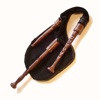
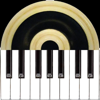
Uilleann is an authentic sounding 3/4 set of Uilleann pipes (Irish Bagpipes) chanter, drones, and two regulators in the form of a standard two octave piano keyboard and also supports hardware MIDI bagpipes chanters connect to a hardware MIDI interface.
The app can also be used as a CoreMIDI sound module for MIDI file player apps.
The app plays the four most common keys for the instrument of D, C#, C, and B.
Touch the drone puck image to switch the drones on and off.
Touch the keys to play the chanter notes.
Touching in the upper half of the key plays the note at standard pitch. Touching lower on the key plays with the pitch proportionally lower to allow for pitch bending and vibrato effects
Finger vibrato for expression, as is done on the real instrument, can be added by sliding back and forth along the length of the chanter keys. The note C has an extended pitch bend range as typically used when playing a real chanter.
Play the regulator chords by touching the four squares above the keyboard on the left.
The chords match the tenor/baritone regulator pairs and are:
F#/D
G/D
A/F#
B/G
Since the real Uilleann pipes chanter doesn't play below D, the two regulators for chords may also be played on the upper and lower halves of the C and C# at the bottom of the keyboard.
Touch the mixer icon at the upper right to bring up the settings page where you can select the key (D, C#, C, or B), set the volumes of the chanter, drones, and regulators, set the amount of drone chorus effect, overall reverb level, and MIDI chanter parameters.
MIDI Chanter Setup:
Connect your MIDI chanter first using a hardware MIDI interface, then launch the Uilleann for iPhone app.
Use the MIDI controls on the settings page to set the MIDI channel for the chanter and drone notes as well as the lowest MIDI note for your MIDI chanter.
Range of the lowest MIDI note is from 55 to 79.
MIDI default parameter values are based on the Fagerstrom Uilleann Technopipes:
Drone channel: 15
Chanter channel: 1
Lowest Note: 69
The app responds to MIDI Pitch Bend messages on the Chanter MIDI channel. Pitch bend response is based on a two semitone maximum bend range.
The four regulator pairs now may be played on the MIDI channel one higher than the chanter starting on MIDI note 64 (E3).
MIDI notes 64 - 67 on the regulators channel play the regulator pairs. These notes match the mapping for the same baritone/tenor regulators used in the iPad version of the app.
The app can also be used as a CoreMIDI sound module for MIDI file player apps. The chanter, regulator, and drones channels will be mapped as described above.
MIDI channel and lowest note values are saved on exit.
The app can also be used as a CoreMIDI sound module for MIDI file player apps.
The app plays the four most common keys for the instrument of D, C#, C, and B.
Touch the drone puck image to switch the drones on and off.
Touch the keys to play the chanter notes.
Touching in the upper half of the key plays the note at standard pitch. Touching lower on the key plays with the pitch proportionally lower to allow for pitch bending and vibrato effects
Finger vibrato for expression, as is done on the real instrument, can be added by sliding back and forth along the length of the chanter keys. The note C has an extended pitch bend range as typically used when playing a real chanter.
Play the regulator chords by touching the four squares above the keyboard on the left.
The chords match the tenor/baritone regulator pairs and are:
F#/D
G/D
A/F#
B/G
Since the real Uilleann pipes chanter doesn't play below D, the two regulators for chords may also be played on the upper and lower halves of the C and C# at the bottom of the keyboard.
Touch the mixer icon at the upper right to bring up the settings page where you can select the key (D, C#, C, or B), set the volumes of the chanter, drones, and regulators, set the amount of drone chorus effect, overall reverb level, and MIDI chanter parameters.
MIDI Chanter Setup:
Connect your MIDI chanter first using a hardware MIDI interface, then launch the Uilleann for iPhone app.
Use the MIDI controls on the settings page to set the MIDI channel for the chanter and drone notes as well as the lowest MIDI note for your MIDI chanter.
Range of the lowest MIDI note is from 55 to 79.
MIDI default parameter values are based on the Fagerstrom Uilleann Technopipes:
Drone channel: 15
Chanter channel: 1
Lowest Note: 69
The app responds to MIDI Pitch Bend messages on the Chanter MIDI channel. Pitch bend response is based on a two semitone maximum bend range.
The four regulator pairs now may be played on the MIDI channel one higher than the chanter starting on MIDI note 64 (E3).
MIDI notes 64 - 67 on the regulators channel play the regulator pairs. These notes match the mapping for the same baritone/tenor regulators used in the iPad version of the app.
The app can also be used as a CoreMIDI sound module for MIDI file player apps. The chanter, regulator, and drones channels will be mapped as described above.
MIDI channel and lowest note values are saved on exit.
Latest updates
3.6
Faster response time and sound quality improvements.
The four regulator pairs now may be played on the MIDI channel one higher than the chanter starting on MIDI note 64 (E3).
MIDI notes 64 - 67 on the regulators channel play the regulator pairs. These notes match the mapping for the same baritone/tenor regulators used in the iPad version of the app.
More robust support for using the app as a sound module via CoreMIDI with other MIDI file player apps.